How to Check IPO Allotment Status?
You’ve applied for an IPO (Initial Public Offering). You’re excited, dreaming about listing gains, already calculating profits in your head like, “Bhai, ₹10,000 ka lagaaya ₹20,000 ka mil gaya toh full party!” But days pass, no SMS, no email, no idea what happened. Did you get the shares or not? Relax. Here's everything you need to know about checking your IPO allotment status
What is IPO Allotment?
When a company launches an IPO (Initial Public Offering), it offers a limited number of shares to the public. But if more people apply than there are shares available, which happens a lot with hyped IPOs, then not everyone gets a piece. Here’s where the IPO allotment comes in.
IPO allotment is the process of distributing shares to the investors who applied for them. But if demand is high (which it usually is), the company can’t give shares to everyone. So, a computerized lottery system randomly selects who gets shares and who doesn’t.
- If you’re picked, you get the shares, and money is deducted.
- If not, your money is refunded automatically to your bank account.
How to Check IPO Allotment Status Online?
If you want to check IPO allotment, then you must know there are several ways to do it:
1. Through the Stock Exchange
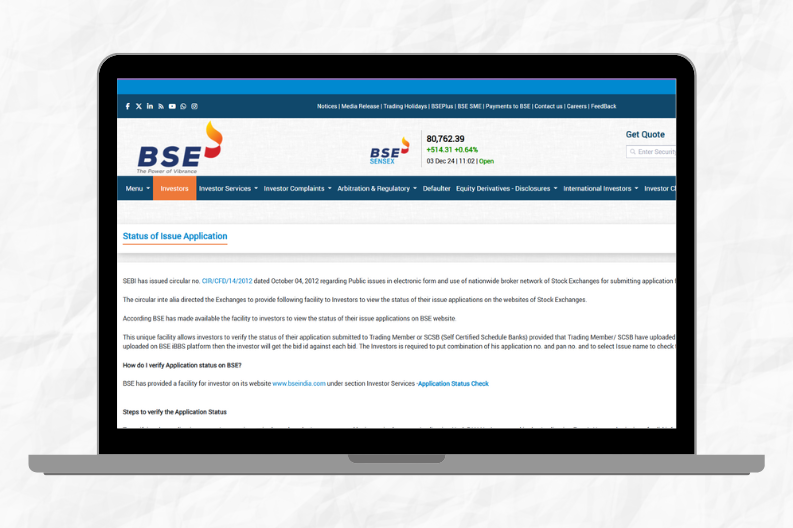
Here you can check IPO allotment Status via BSE or the NSE by following these simple instructions:
- Navigate the BSE Website.
- Locate the status application section so you can access the BSE IPO allotment check page.
- Select the issue type, so choose the equity from the drop-down menu under the Issue Type section.
- Then you have to select the IPO company from the list, whose IPO you applied for.
- Now, enter your application number or PAN in the required field.
- Click on the submit button.
2. Through the Registrar's website
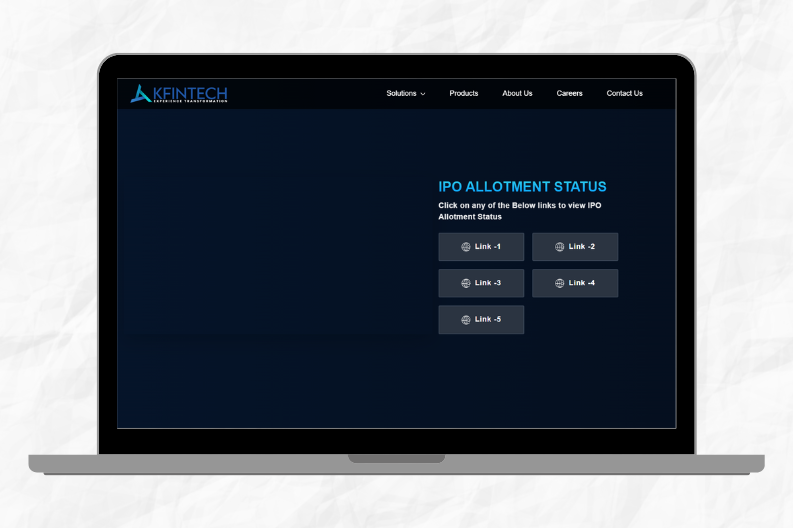
This platform, like Link Intime or KFintech, also offers an easy way to perform an Allotment status check online, so you can access these sites and follow similar steps.
- Navigate the registrar's official website.
- Visit the IPO allotment status section.
- Enter the details such as PAN, DP ID / Client ID, and Application number.
- Then, click on the submit button to view your allotment status.
Also check - How to check IPO Allotment Status in Groww App
When Can You Check the IPO Allotment Status?
You can check if it is usually made available 4-5 days after the IPO closes. If the IPO closes on November 25th, you can expect allotment results by November 30th.
IPO Allotment Status Check
| Company Name | IPO Dates | Price Band | Allotment Date | Listing Date | Exchange | Check Allotment Status |
|---|---|---|---|---|---|---|
| MobiKwik | Dec 2024 (TBD) | TBD | TBD | TBD | NSE, BSE | Check Status |
| Mamata Machinery | Dec 2024 (TBD) | TBD | TBD | TBD | NSE, BSE | Check Status |
| Avanse Financial Services | Dec 2024 (TBD) | TBD | TBD | TBD | NSE, BSE | Check Status |
| Tata Technologies | Nov 29 - Dec 2, 2024 | ₹500-₹550 | Dec 6, 2024 | Dec 10, 2024 | NSE, BSE | Check Status |
| Bajaj Housing Finance Ltd. | Nov 15 - 18, 2024 | ₹350-₹400 | Nov 21, 2024 | Nov 25, 2024 | NSE, BSE | Check Status |
| LIC | May 4 - 9, 2024 | ₹902-₹949 | May 13, 2024 | May 17, 2024 | NSE, BSE | Check Status |
| Property Share Investment Trust | Dec 2 - 4, 2024 | TBD | TBD | Dec 9, 2024 | NSE, BSE | Check Status |
| Rajputana Biodiesel Ltd. | Dec 3, 2024 | TBD | TBD | TBD | NSE, BSE | Check Status |
| C2C Advanced Systems Ltd. | Dec 3, 2024 | TBD | TBD | TBD | NSE, BSE | Check Status |
| Suraksha Diagnostic Ltd | Dec 3, 2024 | TBD | TBD | TBD | NSE, BSE | Check Status |
| Genext Student Pvt Ltd. | Dec 5 - 8, 2024 | ₹350-₹400 | Dec 12, 2024 | Dec 15, 2024 | NSE, BSE | Check Status |
| Shree Krishna Paper Mills | Dec 7 - 10, 2024 | ₹210-₹250 | Dec 14, 2024 | Dec 18, 2024 | NSE, BSE | Check Status |
| K K Super Mart Ltd. | Dec 10 - 13, 2024 | ₹400-₹450 | Dec 17, 2024 | Dec 20, 2024 | NSE, BSE | Check Status |
| XpressMoney Pvt Ltd. | Dec 12 - 15, 2024 | ₹500-₹550 | Dec 18, 2024 | Dec 22, 2024 | NSE, BSE | Check Status |
| PackMan Inc. | Dec 14 - 17, 2024 | ₹550-₹600 | Dec 20, 2024 | Dec 25, 2024 | NSE, BSE | Check Status |
How to Know if You Got IPO Shares or Not?
Not everyone wants to go hunting around websites and enter PAN numbers. Sometimes, you just want to know quickly: Did I get the shares or not?
Here are some clear signs that tell you the answer, even without checking Link Intime, KFintech, BSE, or NSE.
Signs That You GOT IPO Shares
You probably hit the jackpot if:
- You receive an SMS or email from your broker saying something like: "Dear investor, 15 shares of Company XYZ have been credited to your Demat account."
- Shares are visible in your app. Open your Zerodha, Groww, or Upstox app and check under Holdings or Portfolio.
- Refund is partial: If you applied for ₹15,000 and only ₹10,000 is refunded, that means ₹5,000 went into buying shares.
Signs That You DIDN’T Get IPO Shares
Sorry, luck didn’t favour you this time if:
- You receive a full refund into your bank account or UPI ID, and the entire blocked amount is unblocked.
- Your Demat account shows zero shares, and nothing has been added to holdings.
- The registrar website says "No records found" when you check using your PAN or application number.
Common Issues and Their Solution
Here are some common issue and their solutions at the time of IPO allotment:
Server Issues / Website Not Loading
What happens: The registrar's website (like Link Intime or KFintech) may crash or become super slow during peak hours.
Why: Thousands of investors are checking at the same time, so the site gets overloaded.
Solution:
- Try checking late at night or early morning when traffic is low.
- Use a different device or browser if one isn't working.
Think of it like trying to book a train ticket during Tatkal. Everyone rushes in at once; better to wait for the crowd to clear.
Invalid PAN or Application Number
What happens: You enter your PAN number or application number, and the site says "Invalid details" or "No record found."
Why:
- Typing error (missing a letter or number)
- The wrong IPO was selected from the dropdown
- Using lowercase PAN instead of uppercase
Solution:
- Double-check your PAN number, type in ALL CAPS with no spaces.
- Verify that the IPO name is selected correctly.
- Match the application number exactly as in your broker app/email.
Always copy-paste the application number from your broker’s message instead of typing it out.
Delayed Updates on Registrar Website
What happens: Even after the allotment is declared, the status shows nothing or gives an error.
Why: The registrar's database hasn't fully updated yet.
Solution:
- Wait a few hours and try again.
- Meanwhile, check with your broker app (Zerodha, Groww, etc.), they often update allotment status faster.
- You can also check your bank account; if the blocked amount is deducted partially, you likely got the shares.
Conclusion
In conclusion, applying for an IPO is exciting, especially when you’re hoping for listing day profits. But the real suspense starts once the application is done. That’s when the big question hits: “Mila kya?” Now you know exactly how to find out whether you got the shares or not, how to check it using PAN or app number, what tools to use (like Link Intime, KFintech, BSE, or even your broker app), and what to do when things don’t work.